Like any computer, Macs may experience occasional wifi issues. Basic fixes include toggling Wi-Fi off and on and fully resetting your Mac’s network configuration.
However, there are times when these might not work, and your Mac will continue to drop its connection.
If this happens, then you might find yourself regularly restarting, logging out and back in, or otherwise repeating tasks in hopes to clear the problem, but this might be somewhat fruitless, and the fix might in fact be with some lower-level settings in your Mac.
WHY??? It's a brand new Macintosh computer, top of the line???
Power Settings on the portable Macintosh may be at fault here. This may especially be relevant if you have purchased your Mac and then upgraded to a newer (and free) version of macOS in the App Store (usually in the Fall). OS upgrades can sometimes leave the systems in unexpected conditions.
Open a Terminal session, and type:
# pmset -g custom
This will list the power settings of your Macintosh.
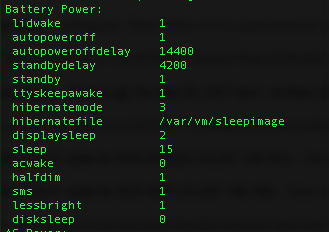
The above laptop is set to sleep after 15 minutes while on battery. Let's see if the Energy Saver System Preferences GUI items match the Terminal value after my free upgrade to macOS Sierra 10.12:
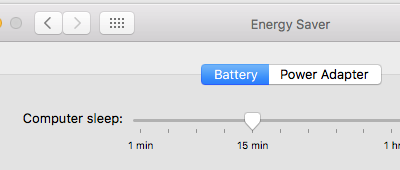
Yes! On this Mac everything is (still) fine. If your Mac is showing different values in the Terminal vs. GUI, you should try to force the GUI to overwrite the system preferences by dragging the slider all the way to the right so (at least temporarily) your Mac is set to never sleep:
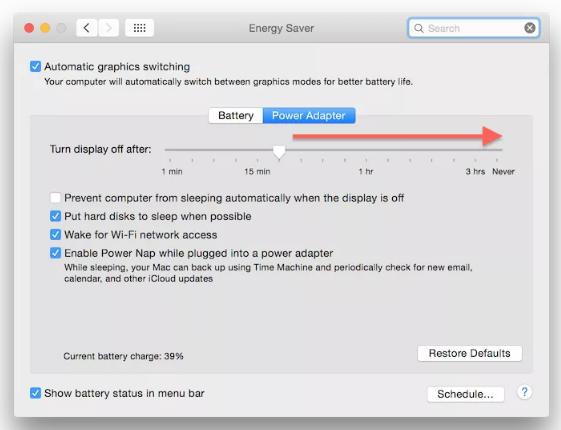
Quit out of System Preferences, then go back to Energy Saver and move the slider back to the desired sleep settings (our test Mac is set to sleep after 15 minutes). Exit from System Preferences.
Check again that both the pmset Terminal command and the Energy Saver GUI are showing the same values:
# pmset -g custom
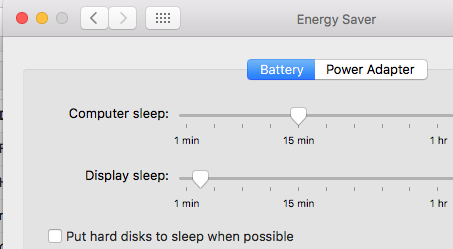
Finally, we found this (optional) step to be helpful as well - uncheck the "Put hard disks to sleep when possible" option checkbox:
Hope this helps our Mac users (especially the people with MacBook Air).
Click here for how to reset your Mac's SMC (system management controller).
0 Comments